
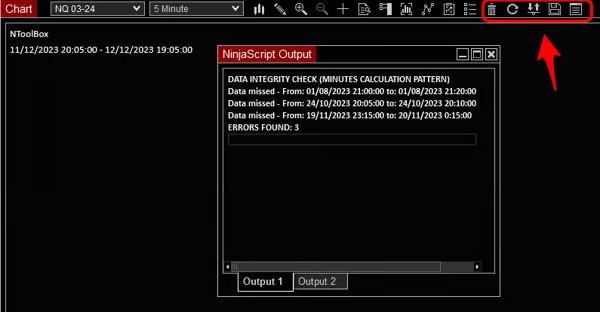
NToolBox
Free
NToolBox
1.0
The indicator adds some shortcuts and additional functionalities to the toolbar:
Remove all drawing objects (shortcut)
Refresh the chart (shortcut)
Show/Hide plot executions (shortcut)
Save a chart image in a specific folder (new functionality)
Historical data integrity check by minute (new functionality)
ADDITIONAL INFO:
The minute data integrity check works only in minute timeframe charts, its checks if we have some missing data.
Sometimes for different reason, we have some missing historical data and lots of indicators don't work as expected.
If you use indicators based on tick calculation like order flow, delta, volume profile by tick, etc. and you want be sure you have good data, please contact us for "Tick data integrity check" indicator.
TIPS FOR MISSING DATA:
If we have some missing data, we can try these solutions:
Force download data from Control Center -> Tools -> Historical Data
Disconnect and reconnect your data feed, this will force to contact a new historical server (you can check it in Control Center -> Log)
Start from scratch with new workspace and a new chart
Contact the NinjaTrader support (or Kinetick if you are using it) and specify the date where you have missing data and your historical server you are connected in